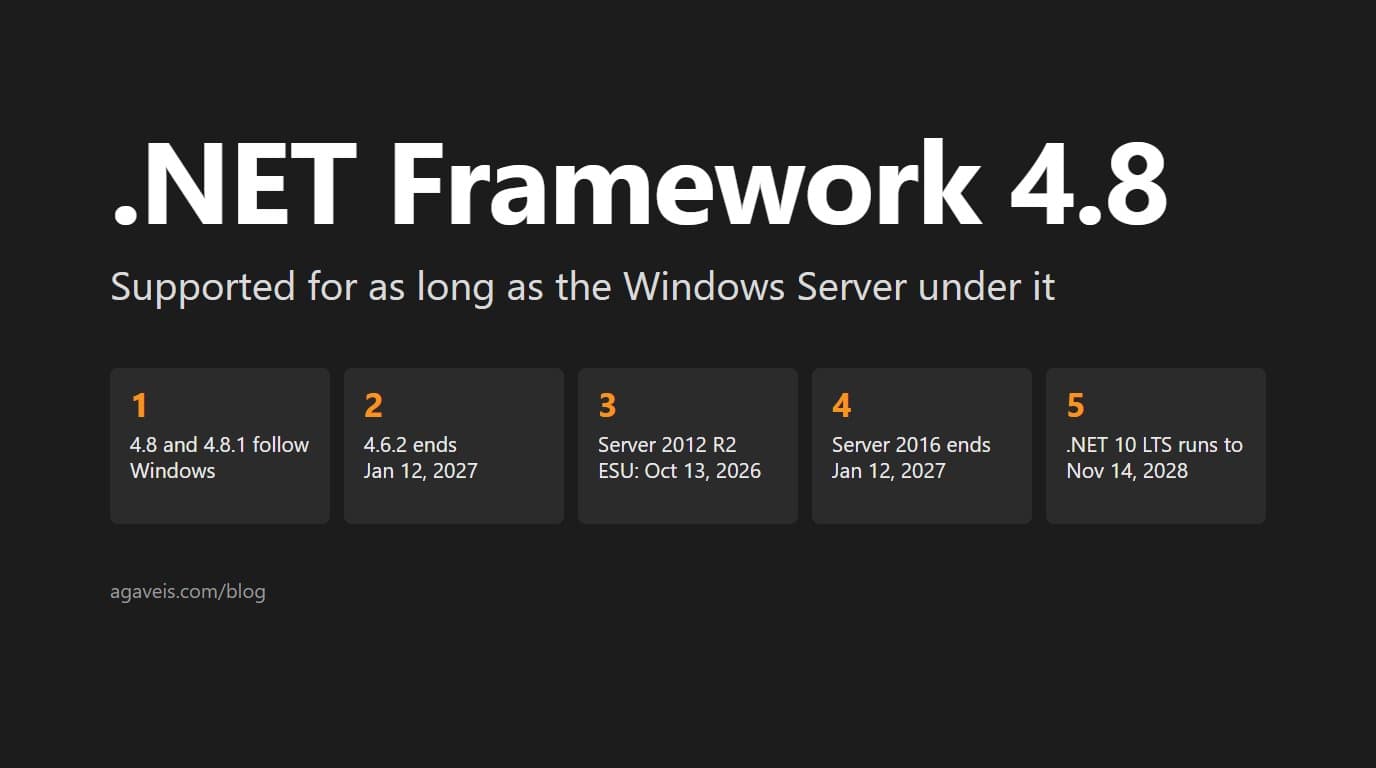
Short answer: not by itself. Neither .NET Framework 4.8 nor 4.8.1 has an end-of-life date of its own. Since version 4.5.2, Microsoft defines .NET Framework as a component of Windows, and it "follows the lifecycle policy of the underlying Windows OS on which it is installed." Version 4.8 is supported for as long as the Windows version under it is supported. That makes the server the real deadline, and for some servers that deadline has already passed.
Microsoft's Dates for Each .NET Framework 4.x Version
Microsoft's .NET Framework support policy gives these dates:
- 4.0, 4.5 and 4.5.1: support ended January 12, 2016.
- 4.5.2, 4.6 and 4.6.1: support ended April 26, 2022, when Microsoft retired releases signed with SHA-1 certificates.
- 4.6.2: support ends January 12, 2027.
- 4.7, 4.7.1, 4.7.2, 4.8 and 4.8.1: no end date of their own. Each is supported for as long as the Windows version it is installed on.
Version 4.8.1 is the latest release. Microsoft says it will keep shipping with future releases of Windows, and that as long as it is installed on a supported version of Windows, it stays supported.
The Real Deadline Is the Windows Server Underneath
Because 4.7 and later inherit their support from Windows, the date that applies to an application is the end date of the server it runs on. Microsoft's dates for recent Windows Server versions:
- Windows Server 2012 and 2012 R2: extended support ended October 10, 2023. Extended Security Updates added Critical and Important security updates for at most three years after that, and the third and last year ended October 13, 2026.
- Windows Server 2016: extended support ends January 12, 2027, the same day as .NET Framework 4.6.2 and IIS 10 on Windows Server 2016.
- Windows Server 2019: extended support ends January 9, 2029.
- Windows Server 2022: extended support ends October 14, 2031.
- Windows Server 2025: extended support ends November 14, 2034.
Microsoft calls Extended Security Updates "a temporary bridge" to a supported platform, and says the program does not extend the product's lifecycle. So the same 4.8 application can be supported until 2031 on Windows Server 2022, while on Windows Server 2012 R2 it sits on an operating system whose extended support ended in 2023 and whose last Extended Security Updates year ended in October 2026. Desktop applications follow the same rule, set against the Windows version on each machine.
What Support Means for a 4.8 Application
Support is real, and narrower than it sounds. When Microsoft announced in May 2019 that 4.8 would be the last major version of .NET Framework, it said it would keep servicing it with bug, reliability and security fixes and keep shipping it with Windows. It also said all future investment in .NET would go into .NET Core, which Microsoft now simply calls .NET.
That leaves a 4.8 application patched but standing still while the rest of the ecosystem moves. Microsoft's porting guide puts the library side in one line: ".NET Standard 2.0 was the last version to support .NET Framework." Libraries that move past it leave .NET Framework behind. Web Forms will not make the move at all: Microsoft's guide for Web Forms developers says it "won't be ported to .NET Core or .NET 8."
Check What You Actually Run
The version in the project file and the version on the server can differ. Microsoft describes 4.6.2 and later as compatible, in-place updates over earlier 4.x versions, and says it expects applications built for those versions to keep running without a recompile. So an application built for 4.6.1 can be running on 4.8 without anyone having changed it. Check all three of these for every application:
- The project file. A classic .NET Framework project names its target in a
TargetFrameworkVersionelement, such asv4.8. An SDK-style project usesTargetFrameworkwith a moniker such asnet48. In packages.config, each package'stargetFrameworkrecords the project's target at the time that package was installed, so it can lag behind the project. - The installed runtime. Read the
Releasevalue underHKLM\SOFTWARE\Microsoft\NET Framework Setup\NDP\v4\Fullon each server. In Microsoft's table, 528040 or higher means 4.8 or later, and 533320 or higher means 4.8.1 or later. - The operating system. Record the Windows Server version of every machine that runs the application, then set each one against the dates above.
In PowerShell, the registry check is one line:
Get-ItemPropertyValue -LiteralPath 'HKLM:SOFTWARE\Microsoft\NET Framework Setup\NDP\v4\Full' -Name ReleaseThree Ways Forward
Stay on 4.8 or 4.8.1 on a supported server. This is a legitimate choice. Microsoft's guide for Web Forms developers says that without a need for cross-platform support, open source or the newer features, "sticking with ASP.NET Web Forms on Windows is fine." The trade is the one above: the platform is serviced, not developed.
Move the host first. A newer Windows Server buys years of support while the code stays on .NET Framework. Microsoft lists 4.8 as supported on Windows Server 2019 and 2022, and 4.8.1 on Windows Server 2022 and 2025. It also recommends validating a runtime update in a pre-production environment before it reaches production.
Move the runtime. This is the larger job, and the app model decides how much larger. Microsoft's porting guide says projects that need a new app model, "such as moving to ASP.NET Core from ASP.NET, require more work." If you start now, target .NET 10, the current long-term support release, supported until November 14, 2028. Both .NET 8 and .NET 9 reached end of support on November 10, 2026. If the move has you weighing a change of language as well, the post on when to rewrite .NET in Rust works through that decision, and for most systems it lands on modernizing the .NET you already have.
An Example: Web Forms on 4.8, Rebuilt on the Same Database
Moving the runtime does not have to mean moving to .NET. A directory platform in the AgaveIS portfolio ran ASP.NET Web Forms on .NET Framework 4.8: 24 Web Forms pages, directory data read and written through ADO.NET and stored procedures, and user accounts in ASP.NET Identity 2.2.3 on Entity Framework 6.4.4, with OWIN cookie sign-in.
It was rebuilt on Next.js and Prisma against the same SQL Server database. The new data layer reads and writes the same tables, the ASP.NET Identity user tables included, so existing user records and directory data carried forward. Prisma queries replaced the stored procedure calls, and sign-in moved from OWIN cookie authentication to JWT-based sessions. The rebuilt platform runs in production today. Leaving .NET entirely is closer to custom development than to a port, and keeping the database is what let the records come along.
Start with an inventory: each application, its target framework, the runtime on each server, and the Windows Server version underneath. That list tells you which of the dates above apply and which of the three paths fits. If the answer is a migration, the .NET modernization page sets out the path in order, from the project system and data access through identity and deployment. AgaveIS takes on these migrations at a fixed scope and a fixed fee, priced after reading the code.